

FlowField Synth
A desktop and plug-in synthesizer that uses connected nodes to organize synthesis and modulation.
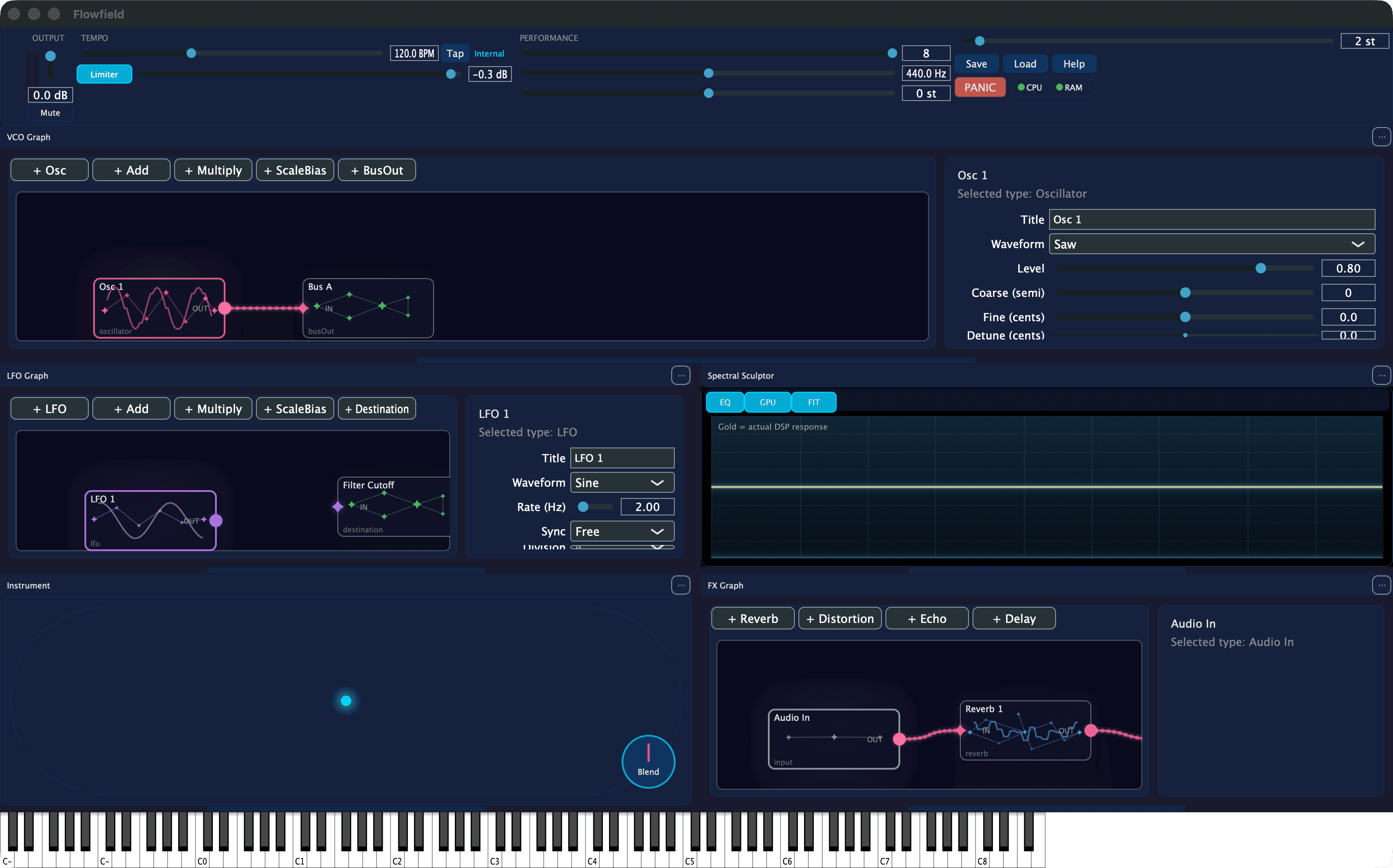
Origin.
FlowField began with a model that felt natural in our heads: use nodes and their relationships as the structure of audio synthesis.
The project is incomplete. The model is still interesting enough to keep it visible.
How it works.
Desktop, plugin, and Linux builds exist, with a mobile path still unresolved.
Current state
Status / Working prototype
Working prototype.
Unfinished. Working builds are available, but the instrument and its interface need more development.
Download FlowField.
Desktop and plugin builds are free. An optional contribution helps keep the experiment moving.
Pay what you like
Choose your price before downloading.
FlowField can be downloaded for free. Keep the default $0 selection, or choose a contribution amount before selecting a platform.
Total downloads: Count unavailable
Selected: $0
macOS
Loading release metadata...
Windows
Loading release metadata...
Linux
Loading release metadata...
Installing on macOS
Version 0.1.1 and newer support Apple Silicon and Intel Macs running macOS 11 or later. The app, AU, and VST3 are universal binaries. These beta builds are ad-hoc signed, without Developer ID signing or notarization.
Quit Ableton Live and other audio hosts before installing. The package installs the app in /Applications, the AU in /Library/Audio/Plug-Ins/Components, and the VST3 in /Library/Audio/Plug-Ins/VST3.
Optional ZIP installer
These steps apply only when the macOS ZIP with per-user installer is listed above. Use it if macOS blocks the package or you prefer to install for just your account.
- Download that ZIP and extract it.
- In Terminal, type
bashfollowed by a space. DragInstall Flowfield.commandfrom the extracted folder into the window, add a space followed by--allow-unsigned, and press Return. This flag explicitly accepts a build without Developer ID signing or notarization. - The ZIP installer requires no administrator access. It installs the AU in
~/Library/Audio/Plug-Ins/Components, the VST3 in~/Library/Audio/Plug-Ins/VST3, and the app in~/Applications.
Use one installation method to avoid duplicate Flowfield AU/VST3 copies in the system and user scan folders.
Find it in Ableton Live
Restart Live. Open Preferences or Settings, then Plug-Ins, and enable Use Audio Units v2 and VST3 System Folders. In older Live versions, these controls are under File/Folder. Hold Option while clicking Rescan to run a full scan, then wait for it to finish. Look for Flowfield under Dream Build Repeat in the Plug-Ins browser and add it to a MIDI track. Flowfield is an instrument and does not provide a VST2 build. VST3 requires Live 10.1 or later.
Ableton's plug-in troubleshooting guideBuild notes
From the work.
Why it stays
An unfinished interface is not a finished instrument. The node model still feels right, so the project remains open instead of being presented as complete.